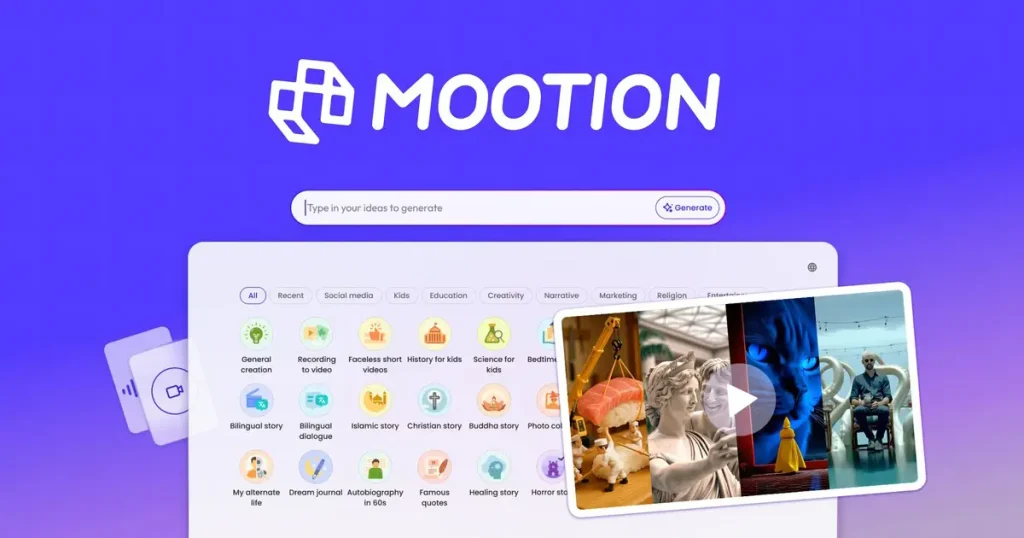
Looking to create professional videos without spending hours or hiring expensive editors? Mootion AI Video Generator might be exactly what you need.
This powerful tool lets you turn simple text prompts into polished, high-quality videos in just minutes. Whether you want tutorial videos, marketing content, or eye-catching visuals, Mootion handles the heavy lifting with ease—generating visuals, voiceovers, and on-screen text automatically. If you’ve ever felt overwhelmed by video creation or wished for a faster, smarter solution, keep reading.
This review will show you how Mootion can simplify your workflow and help your videos stand out effortlessly.
Introduction To Mootion AI Video Generator
Mootion AI Video Generator is a tool designed to create professional-quality videos in minutes using artificial intelligence. It helps users produce engaging videos without deep technical skills or expensive equipment. This introduction explains what Mootion offers, how it simplifies video creation, and who benefits most from its features.
Overview Of Mootion And Its Purpose
Mootion is an AI-powered video creation software focused on speed and ease. It transforms text prompts, scripts, or uploaded documents into polished videos quickly. The main goal is to reduce the time and effort required to produce professional videos.
Key functions include:
- Turning text or ideas into video content
- Providing customizable templates and AI avatars
- Allowing users to edit scripts and visuals easily
This makes Mootion ideal for creating marketing, educational, or social media videos efficiently.
How Mootion Simplifies Professional Video Creation
Mootion removes common barriers in video production. Users don’t need advanced skills or complex software.
Here’s how it works:
- Input your idea as text, script, or document
- Choose from ready-made templates and AI avatars
- Edit the video script and visuals as needed
- Click “Generate” to produce the final video
This process cuts down production time from hours or days to just minutes. It helps users focus on their message without worrying about technical details.
You can also read
1. How to Choose the Right SaaS Software for Your Business?
Read More →2. What is the Difference Between SaaS and Traditional Software?
Read More →Target Audience And Use Cases
Mootion suits a wide range of users who need quick, quality videos. Typical audiences include:
- Small business owners promoting products or services
- Educators creating tutorials and lessons
- Content creators making social media videos
- Marketers needing fast campaign videos
Use cases span:
| Use Case | Description |
|---|---|
| Product Demos | Showcase features and benefits quickly |
| Explainer Videos | Clarify complex ideas simply |
| Social Media Content | Create engaging posts to boost reach |
| Training Videos | Educate employees or customers effectively |
Mootion’s easy approach suits anyone needing fast, professional videos without a large budget or team.

Key Features And Benefits Of Mootion AI
Mootion AI offers a set of powerful tools that simplify video creation. It helps users generate professional videos quickly using artificial intelligence. The platform is designed to save time and effort while maintaining quality.
These features make Mootion AI suitable for marketers, content creators, and businesses that need engaging video content without complex software skills.
AI-powered Video Generation From Simple Prompts
Mootion AI transforms brief text prompts into full videos. Just enter a few words or a script, and the AI creates a video tailored to your input.
- Fast creation: Videos are generated within minutes.
- Smart content matching: The AI selects relevant visuals and scenes.
- Flexible input: Supports scripts, keywords, or simple descriptions.
This feature removes technical barriers and speeds up video production.
Automated Visuals, Voiceovers, And On-screen Text
The platform handles multiple video elements automatically. It creates visuals, adds voiceovers, and inserts text overlays without manual work.
| Feature | Benefit |
|---|---|
| Automated Visuals | Generates relevant images and clips to match the script. |
| Voiceovers | AI voices narrate the video clearly and naturally. |
| On-Screen Text | Highlights key points with readable text overlays. |
This automation reduces editing time and ensures polished final videos.
Intuitive Interface For Effortless Content Creation
The user interface is clean and easy to navigate. No advanced skills or technical knowledge is needed.
- Simple controls: Clear buttons and menus guide the process.
- Step-by-step workflow: Users follow logical steps from input to video output.
- Preview option: Watch drafts before finalizing videos.
This design helps beginners create quality videos without confusion or delay.
Pricing, Pros, Cons, And Recommendations
Understanding the pricing and key features of Mootion AI helps decide if it fits your video creation needs. This section breaks down costs, highlights strengths, notes limitations, and suggests ideal users and scenarios.
Pricing Structure And Affordability Analysis
| Plan | Price | Main Features |
|---|---|---|
| Basic | $19/month | Access to AI templates, 10 video exports/month |
| Pro | $49/month | Unlimited video exports, priority support, HD quality |
| Enterprise | Custom pricing | Team collaboration, API access, dedicated manager |
Affordability: Mootion AI offers competitive pricing for AI video generators. The Basic plan suits casual users and beginners. Pro is ideal for frequent creators needing more exports and features.
Pros
- Speed: Creates professional videos in minutes, saving time.
- Ease of Use: Simple interface with intuitive AI-powered tools.
- Customization: Variety of templates and AI avatars enhance creativity.
- Quality: Produces HD videos suitable for social media and marketing.
- Support: Responsive customer service, especially on Pro and Enterprise plans.
Cons
- Learning Curve: Some users need time to master advanced features.
- Template Variety: More template options could improve creative freedom.
- Export Limits: Basic plan restricts monthly video exports.
- AI Accuracy: Occasional errors in text-to-video conversion require manual edits.
Ideal Users And Scenarios For Mootion AI
- Small Business Owners: Quickly create promotional videos without a team.
- Content Creators: Generate engaging social media clips fast.
- Marketing Teams: Produce consistent video content for campaigns.
- Educators and Trainers: Build instructional videos with minimal effort.
- Freelancers: Offer video creation services with AI assistance.
Mootion AI fits users needing fast, affordable, and professional video production without extensive video editing skills.
Frequently Asked Questions
Can AI Make A 1 Minute Video?
Yes, AI can create a 1-minute video quickly by using text prompts, scripts, or uploaded content. Tools like Mootion and Adobe Firefly generate professional videos in minutes. These platforms customize visuals, voiceovers, and on-screen text to produce clear, engaging videos efficiently.
What Is The Most Professional AI Video Generator?
Mootion stands out as the most professional AI video generator, offering fast, high-quality videos with an intuitive interface. It excels in creating clear tutorials and stunning visuals efficiently.
How To Create A 10 Minute Video Using AI?
Start by choosing an AI video generator like Mootion or Adobe Firefly. Input your script or prompt, customize visuals and voiceovers, then click generate. Edit as needed to ensure flow and clarity. This process creates a professional 10-minute AI video quickly and easily.
Where Can I Make A 3 Minute AI Video?
You can create a 3-minute AI video using Mootion, Synthesia, or Adobe Firefly. These tools offer fast, easy video generation from text or scripts.
Conclusion
Mootion AI Video Generator helps create videos fast and easy. It suits beginners and pros who want quality results. The tool uses simple steps to turn ideas into visuals. Users save time without needing complex skills. Videos look professional and clear on any platform.
This software fits well for marketing, education, and social media. Try Mootion to see how AI can assist video creation today.